
Showing posts with label ANDROID SOFTWARE.. Show all posts

Tuesday, 23 July 2013

BATTERY BOOSTER (AD-FREE) ~ ANDROID APP DOWNLOAD FREE

BATTERY BOOSTER (AD-FREE) ~ ANDROID APP DOWNLOAD FREE


Battery Booster - Boost Your Battery's Running Time and Max Battery Life
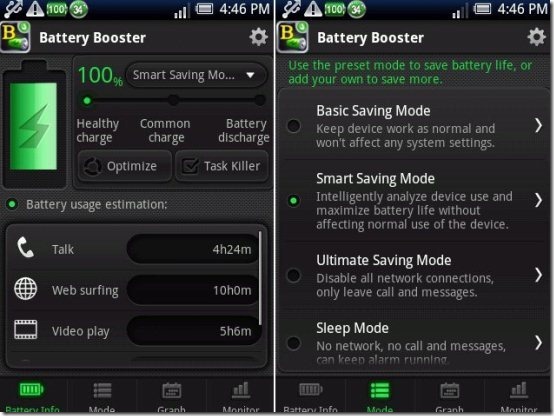
Battery Booster is an all-in-one battery boosting and power management tool for both Android smartphone and tablet. It provides the most accurate battery information, keeps track of the recent battery changes, monitors battery-draining processes, and helps you deal with various battery wasting situations at ease.
*Battery Booster•NEW UI•NEW FUNCTION*
- Interactive design
- Automatic battery saving mode
- Battery usage track & monitor
- Quick network & screen control
*Supported language: English, Korean, Japanese, Simplified Chinese, Traditional Chinese, French
*Feature details*
- Real-time battery usage tracking
Battery Booster provides real-time battery information, including battery level, battery temp, remaining battery usage time, and so on.
- Battery saving mode to save battery at all conditions
Battery Booster offers four preset battery saving modes to help you save more power. These modes watch your system performance and save battery at all possible situations. Besides, personalized modes are welcomed to be added if you need advanced battery saving techniques.
-Battery graph to track battery level/temp/voltage change
Three graphs are given in Battery Booster to track the recent three days battery information, including battery level, temp, and voltage. You can use these statistics to analyze and find out the most effective battery saving mode for yourself.
-Monitor battery consumption of each running program
Battery Booster keeps an eye on all running processes, and shows you the battery consumption ratio of each process. With this information, you will easily find out the battery-draining processes, stop or uninstall them to enhance battery life.
-Quick Settings and Homescreen widget
For easy management of daily used elements, fifteen quick control buttons are available to be added on Homescreen: WiFi, Bluetooth, GPS, Mobile data, Airplane, screen timeout, brightness, haptic feedback, etc. It only takes one line space to add these buttons, yet with them you will no longer need the system settings to adjust network or screen. If widget is not your choice, these buttons are available in Battery Booster settings, too.
-Task Killer to save more battery
Battery Booster saves battery by killing running background processes. For apps that you do not want to kill, you can use Whitelist Manager to protect. Furthermore, with the advanced task manager (Memory Booster - Android RAM Optimizer), Battery Booster can perform better and help you get the best battery saving results!
Download the software from the following link

MEMORY BOOSTER (FULL VERSION) ~ ANDROID APP DOWNLOAD FREE

MEMORY BOOSTER (FULL VERSION) ~ ANDROID APP DOWNLOAD FREE


Memory Booster - Android RAM Optimizer to Speed Up Your Smartphone!
*Memory Booster tablet version is available in Android Market!*
UPDATE: Customers who bought this app via Paypal please contact our customer support for update installation.
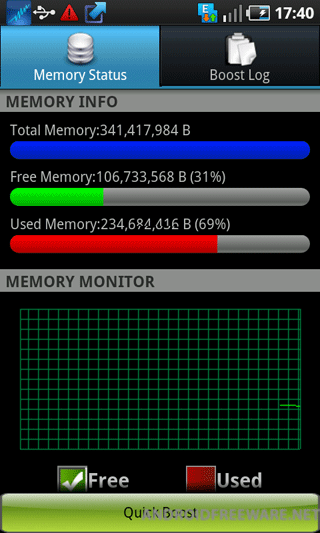
Memory Booster is a powerful mobile memory & RAM boosting tool specially designed for both Android smartphone and tablet users. It is designed to tackle the difficult yet crucial problem of memory management for all Android devices. Memory Booster reclaims lost memory for your programs by defragmenting your device's memory and recovering memory leaks from poorly behaved applications.
Supported language: English, Korean, Japanese, Italian, French, Russian, Spanish, German, Simplified Chinese, Traditional Chinese
Features:
* Real-time Memory Status Report & Monitor
Memory Booster provides a live chart to demonstrate your device's total/free memory and current memory usage.
* Setting Your Performance Target
With Auto Boost Threshold set, Memory Booster keeps your memory higher than desired level, and act immediately if memory drops down.
* One-click Quick Memory Boosting
Besides automatic memory boosting, Memory Booster also allows you to manually boost your memory by Quick Boost.
* Auto-boosting in the Background
With Auto Boost Interval, Memory Booster runs in the background and automatically reclaims memory for your Android at interval.
* Android system crash protection
Memory Booster always watches your system resources and cleans up system memory once it reaches a critical point.
* And there is more…
Other features include embedded Task Killer, Whitelist Manager, Boost Level Manager & Memory Boost Log, which assist Memory Booster to perform more efficiently and friendly.
Kw: memory, ram, booster, optimize, boost, optimization, task killer, task manager, atk, taskiller, memory booster, ram booster, battery, save battery, battery booster, system manager, process kill, speed up, system speed, app killer, system panel, memory cleaner, honeycomb apps, tablet apps, honeycomb apps free download, tablet apps free download, honeycomb, android honeycomb, honeycomb applications, android 3.0, honeycomb download, tablet free apps, honeycomb free apps, 3.0, tablet app download, honeycomb app download


follow link to download

DOWNLOAD BLUESTACKS FOR PC TO RUN ANDROID APPS

Use 750,000 Mobile Apps on Windows or Mac
Get Bluestacks for Windows from the following link
http://cdn.bluestacks.com/public/beta-1/BlueStacks-SplitInstaller_native.exe

Get Bluestacks for Mac from the following link
http://cdn.bluestacks.com/public/mac-beta/BlueStacks_AppPlayer-Beta.dmg


TECHNOLOGY
At the heart of BlueStacks is a multi-OS runtime with breakthrough virtualization technology. Apps developed for different operating systems can execute simultaneously, side-by-side, on the same computer.
BlueStacks employs a lightweight, optimized, soft hypervisor with deep enhancements to support "embedded virtualization". End consumers can enjoy the full Android environment through BlueStacks, or just install Android app icons directly on the Windows desktop. As is the case with any advanced technology, the complexity is completely masked from the end consumer.
The BlueStacks user interface is fully configurable. In addition, BlueStacks can integrate with the custom software experiences designed and developed by PC manufacturers.


Base OS can be Windows, Android, Chrome or LinThe current release of BlueStacks supports Android running on Windows. As the architecture diagram indicates, the BlueStacks virtualization technology can very easily support different permutations and combinations of operating systems and their applications. Some examples include:
• Android on Windows (for x86):
Run Android on Windows simultaneously and seamlessly with the current release of BlueStacks
• Android on Windows (for ARM):
Run Android on Windows on ARM architectures starting with the Windows 8 release
• Android on Chrome OS (for x86):
Run Android apps in a browser tab to augment the app experience in Chrome OS
• Windows on Android (for x86):
Run Windows on Android, boot into Android for faster startup and longer battery life.

POWERAMP MUSIC PLAYER FOR ANDROID FULL VERSION.

POWERAMP MUSIC PLAYER FOR ANDROID FULL VERSION


Powerful Music Player for Android
This application unlocks Poweramp (Trial), powerful music player for Android. Please install Poweramp Music Player (Trial) application first. Unlocker removes the trial period limitation. Any version of Poweramp can be unlocked (v2.x and v1.x).
Follow us on twitter @Poweramp2 to get instant updates on app development progress, feature spotlight, theme sharing, take part in giveaways and even chances for free copies of Poweramp."
***Please update BOTH Unlocker and Poweramp Trial (it's the main app) if you're experiencing any issues with the license.
***Please don't try to update if you purchased Unlocker on Poweramp site, as Market Unlocker is not the same. Just keep your current Unlocker as is.
==========
Common Questions/Answers for Poweramp v2.x:
Q. My songs are missing from folders/library.
A. Please ensure you have all your folders with music actually checked in Poweramp Settings => Music Folders.
Your original Android Library is not changed, nor any files deleted.
Poweramp library is a separate, completely independent library. When you installed Poweramp 2.0, it just got filled with the files scanned from your sd card/other flash memory, as specified in Music Folders.
Q. Where is Auto-advance Setting now in Poweramp 2.0
A. It's merged with Repeat modes. Just keep pressing Repeat mode until Advance List.

Q. Volume too low. Volume changes weirdly. Other volume issues.
A. Try to disable Direct Volume Control in Poweramp Settings => Audio Engine => Advanced Tweaks.
Poweramp 2.x uses Direct Volume Control by default on 2.3+ mid-to-high end devices. On stock ROMs this produces much better audio output. But many custom/buggy ROMs, while supporting DVC, can fail with it.

Q. Poweramp 2.0 widget becomes white/doesn't work on phone reboot
A. This can happen if something blocks Poweramp from starting on reboot and updating the widget - task managers, auto-start tweaking. If you use such apps/tweaks, you may need to add Poweramp (or/and WidgetPack) to exceptions list.

Q. Can I get Poweramp v1.4 look?
A. You can download "Poweramp Classic Skin" on Market.


         Download the software from the following link
http://www35.zippyshare.com/v/57018569/file.html